Showing posts with label Deleting Facebook. Show all posts

Saturday, 18 August 2018

Check Blocked List On Facebook

Want to find out where your blocked friends are on Facebook? We will see how to check Facebook blocked users list so you can decide whether to unblock them or not.

Facebook allows you to block and unblock people. You can block anyone bothering on you Facebook.

So how do you go about accessing those friends or Facebook users that you've blocked? We shall see how to locate users blocked by you on FB.

View Blocked List On Facebook

How To Locate Your Blocked List On Facebook
Below are the steps to be taken in order to view all your blocked list.

To view your Facebook block list:
  • Click  in the top right of any Facebook page
  • Click Privacy Shortcuts
  • Click How do I stop someone from bothering me?
  • Click View All Blocked Users.

Please share this guide. Thank you!


How To Know When You Have Been Blocked on Facebook


Although there are few other reasons which could lead to such conditions of difficulty in finding your Facebook friend. It could be that they have permanently deleted their Facebook account or that Facebook has disabled their account following certain Facebook violation.

Here are the tips on how to know if someone has blocked you on Facebook;

Tip One:
In a situation whereby you have had a Facebook conversation with such a person, go through your inbox to check through your message with the person. Despite the person’s photo would show the default Facebook image, what has to cut your attention is the name.

If such a friend’s name appears in black bold color, and at the same time the name cannot be highlighted as to be clicked on in order to visit the person’s Facebook profile, then this suggests the person might have blocked you on Facebook. This is one tip which helps you answer such questions 

Tip Two:
Another tip on how do I know if someone blocked me on Facebook is to try reporting a conversation with a friend as spam. Simply re-open the message page and the conversation you have had with the person. And then from the menu at the top right of the pop-up screen, tap on “Actions” and then select “Report spam or abuse”.

A new window will open at this point, then select “Report one or more participants in the conversation for harassment or threats, or have a compromised account”. Then tap “OK”.

Another window will open, but then if the window opens and reads “Operation prohibited” right to the user’s name, then this suggests the Facebook friend or user has blocked you on Facebook.

Tip Three:
This third tip seem to be the most easiest method or approach. All you need do is to ask a mutual friend to access the person’s (the Facebook friend in question) Facebook profile. I mean the person you think has blocked you.

If that mutual friend can access the person’s Facebook profile whereas you cannot access the same person’s Facebook profile, it simply means the person actually has blocked you.


Facebook Login Signup Learn More Welcome

Facebook Login Signup Learn More Welcome and also you will concur with me, it is no news that Facebook is the titan of all social media platform, though probably. Actually Facebook has actually gotten significant patronage over the years with the current White Home Authorities Facebook Page to cover all of it.

Facebook Login Signup Learn More WelcomeOn the other hand, no holding up against how prominent Facebook has come to be lots of people still don't much details on just what Facebook Account is all around. For that reason, I will certainly provide you simply a recap of exactly what Facebook Account is everything about in the past continuing with the actions to Join Facebook Account. Facebook was established on February Fourth, 2004 by Mark Zuckerberg as well as his university associates who were trainees as at then in Harvard University.

UNIQUE FEATURES OF FACEBOOK ACCOUNT-Appreciate new Facebook Live video clip broadcast, this simply means you need to constantly run to YouTube share you videos as Facebook now obtained the magic stick of video broadcast.

-Face has actually also catered for your service rate of interest via it Facebook Messenger for business which allows you monitor your sopping and purchases.

-You can now link your web site's individuals from Facebook quickly to upload their comment utilizing Facebook Real-time remark.

-With Facebook Carrier App you can get in touch with Facebook from anywhere through your mobile, improving your Facebook shopping as well as video program.

-Earn money on Facebook through their countless liberal ad exchange displayed on mobile.

-Share your feelings, Photos, Videos, easily through your Timeline with good friends and link with universe via Facebook profiles, Facebook pages and also Facebook groups.

DEVELOP NEW FACEBOOK ACCOUNT - WELCOME TO FACEBOOK NEW ACCOUNT SUBSCRIBE GUIDELINES
Adhere to these detailed guide below to develop new Facebook account currently. And also remember you can create Facebook account complimentary making use of Gmail/ other email or Contact number.

1. Logon to www.facebook.com.

2. Facebook homepage also called Facebook Join Page and also FbLogin Page will certainly show up.

3. Enter your Name, Email Address/Phone number.

4. Fill out your Password, Birthday Celebration and also Gender.

5. After that, click "Authorize Up" to create your Facebook account.

6. At the same time, as a Facebook account new user you will certainly have to confirm your Email Address/Phone number via verification.

7. Enter the Confirmation code sent to you through Email or SMS, correctly on the space specified for it.

Steps To Login Facebook Account:

1. First, you have to open up any of the web browsers to Login Facebook. You can likewise open Facebook Application.

2. Now you have to click on the Login choices which is at the top right edge of the display.

3. There in the very first empty box, you need to go into the e-mail id or the phone number that you have actually utilized while Sign Up procedure.

4. After entering the e-mail address or contact number, you need to enter the password. After going into the password, you have to pick the Login alternative and click it.

5. With that, the procedure of Facebook Login is full.

Hope this ideas were valuable? Really feel complimentary to make use of the remark box listed below for your concerns and pertinent payments on Facebook Login Signup Learn More Welcome. Many thanks.

Close Facebook

Are you tired of Facebook and also you are confused on the choice to take: Closing it briefly or completely? You have to have the ability to set apart in between the two. Bear it in mind that Closing it Briefly means DEACTIVATION while Closing it Completely suggests REMOVAL. So, let's see the differences between both.

How Deactivate Facebook Account
You can deactivate your Facebook account temporarily and choose to come back whenever you want.
To deactivate your account:

  • Click the account menu  at the top right of any Facebook page
  • Select Settings
  • Click General in the left column or visit: web.facebook.com/settings?tab=account
  • Choose Manage your account then follow the steps to confirm

If you deactivate your account your profile won’t be visible to other people on Facebook and people won’t be able to search for you. Some information, such as messages you sent to friends, may still be visible to others.

Disable Your Facebook Notifications

Facebook can be a terrific device for many activities, from playing easy online games to staying connected with old friends as well as making new pals. Nevertheless, every so often, individuals might locate themselves bewildered with the variety of alerts they're getting through e-mail or on their mobile devices. 
Disable Your Facebook Notifications

How Do I Disable Facebook Notifications
Email
If you no longer wish to receive e-mail alerts for activities related to Facebook:
Log right into your Facebook account.

1. Click Triangle Food selection Facebook triangular food selection in the leading right-hand edge of the screen.

2. Choose Settings from the drop-down menu that appears.

3. In the menu that shows up on the left-hand side of the screen, select Notifications.
Select Email.

4. Under WHAT YOU'LL RECEIVE, click the circle next to Only notices about your account, safety and security, as well as privacy.

5. In the box that shows up, click Shut off.

AndroidTo both beginning and also stop push notices on an Android smart phone:

- Touch the Food selection icon Facebook mobile menu and scroll down up until you see Account Settings.

- Tap Account Settings, Notifications, as well as then Mobile Press.

- Inspect the boxes alongside the items you wish to be alerted around and uncheck packages to eliminate alerts.

iPhone or iPadTo enable push notifications:

a. Tap the Settings Icon iOS Settings Symbol on your device's home screen.

b. When the menu is open, tap Notifications, and afterwards Facebook.

c. Slide the button alongside Enable Notices so that it's eco-friendly.

d. Establish your Alert Design to Banners or Alerts.

e. Toggle the switch following to Program in Alert Facility so it is eco-friendly.

f. Toggle the button alongside Show on Lock Display so it is environment-friendly.


To turn alerts off:
1. Touch the Settings Symbol iOS Settings Symbol 2 on your tool's house display.

2. As soon as the menu is open, faucet Alerts, and after that Facebook.

3. Move the button alongside Allow Alerts to ensure that it's not eco-friendly.

To alter alert setups:

a. Tap the Setups Symbol iOS Setups Symbol 3 on your device's home screen.

b. Once the food selection is open, tap Notices, and afterwards Facebook.

c. Under the Notifications area, toggle the switches to your preference and also pick your alert design at the base of the screen.


How to Deactivate My Facebook Account

While Facebook is fairly preferred, sometimes people intend to quit utilizing their make up one reason or an additional. The complying with procedure will certainly deactivate your Facebook account, which is convenient as you'll have the ability to return to Facebook eventually in the future if you pick to do so. To continue, comply with the action in the area listed below.


Keep in mind: Deactivating your account is not the exact same point as removing your Facebook account. This procedure just suspends your account as well as does not eliminate it permanently.

Deactivating a Facebook account. How To Deactivate My Facebook Account

1. Log right into your Facebook account.

2. Click on the Account Menu switch Facebook account food selection button that lies in the upper-right hand corner of the display.


3. Select Setups from the drop-down menu.

4. Select Security in the left-hand column.


5. Select Deactivate your account, and afterwards adhere to the steps to finish the process.

Note: After you have actually finished this procedure, you will certainly no longer be searchable nor noticeable to pals on Facebook.

Yahoo Mail Sign In with Facebook Account

Facebook has an advancement and clever privacy setup as well as you can quickly hide your email as well as other info from anyone. So allow suppose your close friend is a master of Facebook privacy and you wish to know his/her email address for whatever objective. In this article we will show you how to login into your Yahoo mail account with Facebook.

Yahoo Mail Sign In with Facebook Account

Yahoo Mail Sign In With Facebook Account

Yahoo mail has a long history as well as delights in terrific appeal the yahoo mail Sign in app consists of a great deal of alternatives as well as it is extremely incredible as well as provides a variety of options.

If you are believing to make a yahoo mail Sign in brand-new account then exactly what are you waiting on simply see yahoo.com as well as take full pleasure of this web server as it is a popular as well as popular site for risk-free and safe and secure sharing information as well as details.

If you are making use of yahoo mail on your cellphone then you could quickly use this yahoo mail login in mobile as it is really simple to operate and it is really much less time consuming.

There are numerous alternatives whereby you could make use of yahoo mail register without mobile, and there are lots of various other options like laptop as well as personal computers also.As this opens up on every gadget quickly.

After opening the web site of yahoo.com you would certainly obtain yahoo mail login display united states if you are from united states of america and also it is exact same around the globe and the website stays the same as well as it does not transform and also it remains the exact same throughout the world any place you open this site.


Yahoo Mail Register
If you wish to Log in with facebook after that you could conveniently do this via yahoo mail Sign in facebook login as this new choice is also available by yahoo as well as this is very new as well as most current upgrade by yahoo.

If you are utilizing yahoo mail and you neglect your password then this would definitely help you out so utilize this yahoo mail Sign in failed to remember password and get the far better remedy for your issue and also if you enjoy by this then let us understand by leaving a comment listed below.

Hope you all would pleased by the information which is mentioned over individuals if you believe that this info is satisfactory after that please share it with your family and friends members as well as make it preferred as much as you could to ensure that your close friends can also make use of these details.

How to Delete Facebook Account Permanently | Deactivate Facebook Account

If you request for facebook to delete your account, you will not be able to access your facebook account forever. Usually when deletion process, Facebook gives a grace period until completely you facebook account deleted permanently. So if you change your mind, you can cancel the facebook account deletion process.


How to permanently delete facebook:
  1. Log into your Facebook account.
  2. Click on the link https://www.facebook.com/help/delete_account.
  3. Select Delete my account.
  4. Enter a password and code chaptca, and then click Ok.
  5. On the pop-up Permanently Delete Account , click Ok.
Deactivate A Facebook AccountIf you request for facebook to deactivate your account, your friends on facebook will not be able to find your account or other activities. In this process, make sure you have access to your email account, because if you want to activate your account again, so facebook will send you the activation facebook account link via email.

To deactivate your facebook account:
  • Select the settings menu on your Facebook account.
  • Select Security.
  • In the options Deactivate Your Account, click Edit.
  • Click Deactivate Your Account
  • Enter the password, and then click Deactivate Now.
  • Select your reason for deactivating the account.
  • Click Confirm.
How to Permanently Delete a Facebook Account1. Please sign in to your facebook account.

2. Then, click link permanent delete facebook account.

3. Next, the display will appear as shown below, click "Delete my account".

4. Then, pop up will appear as below. Please enter the password of your facebook account, then fill in the code chaptca. After that, click "Okay".


5. Then, pop up will appear as below. Just click "Okay".


6. Then automatically you will log out a facebook account. Then in 14 days later, your facebook account delete permanently.

How to Delete A Facebook Comment

It's tough not to really feel somewhat pull down by humanity when you review some Facebook comments. Your Timeline as well as articles don't have to add to the crisis of bad commenting. You could remove any type of remark you uploaded, going back to your first discuss Facebook. You can also go above and beyond, erasing comments various other individuals made on your messages.


How To Delete A Facebook Comment
Your Own comments
Whether you commented on a Timeline article, a picture, a link or a few other article, the comments areas look and work the same. Anywhere you upload a talk about Facebook, you can delete it utilizing the exact same technique. Remove your remark by clicking the "Edit or Delete" pencil icon near your comment. Click "Delete" then click "Erase" again in the confirmation window to finish the process.

Various Other Peoples' comments
Unlike with your very own comments, you cannot just go deleting other individuals' discuss points you really did not publish or on messages you made to a team or Facebook page. You can only erase other individuals' comments when they're made on your own Timeline's blog posts, photos as well as video clips. If you're a group or web page manager with sufficient opportunities, you can erase other individuals' talk about page posts. Remove another person's comment by floating your arrow over the comment, clicking the "X" symbol and also selecting "Erase.".

Edit a Comment
Probably your remark isn't really entirely without quality; maybe you can restore it if you might just deal with that glaring typo. It this situation, the Edit attribute is your new buddy. When you go to erase among your comments, click the "Edit or Erase" drop-down food selection's "Edit" switch. Currently you could repair your comment without having to delete it. When you are finished, push the "Go into" secret to save the modifications to the new-and-improved comment.

Discover Your comments
You cannot erase just what you cannot locate. Your Task Log keeps neat records of your Facebook activity, including comments. Click the "View Task Log" web link on your Timeline's cover photo and also select "comments" to see all the comments you have actually ever made. Utilize the year and also month web links to navigate through your commenting background and erase to your heart's material.


How to Permanently Delete Facebook

You could not constantly clean the slate clean and also begin again in the real world, but you can definitely do it on Facebook! Often it is much easier to simply delete Facebook account completely than to adjust personal privacy setups or clear out your good friends listing on your current one.

How Delete Facebook Account
Below step by step guide lead you to delete Facebook account:

1. Login to your Facebook account and then click below secret delete Facebook account link.

2. Pop up window will appear and then click Delete my account


3. Confirm your decision with pop-up window. The pop-up window says “You are about to permanently delete your account. Are you sure?“. Enter password and security check and then click ok


4. After confirming, again new pop-up window appears “Permanently Delete Account“. It says ” Your account has been deactivated from the site and will be permanently deleted within 14 days. If you log into your account within the next 14 days, your account will be reactivated and you will have the option to cancel your request.”


5. Now you would be logged out from your Facebook account. Check your email with the subject “Account Scheduled for Deletion“. In a mail you are requested again to cancel your request to permanently delete your account. It indicates that Facebook still doesn’t want to lose you. If you still want to come again to Facebook world, login with a given link.


6. When you will log in again, a new pop-up appears. It say to either to “Cancel Deletion” or “Confirm Deletion“. Now again the choice is yours, “Cancel Deletion” if you want to come again or “Confirm Deletion” if you still stick with your decision.

Things to Note
1. Never login again next 14 days, if you are sure you wish to permanently delete your account.

2. If you wish to come back again, simply follow the link below within 14 days

3. Must log out of anything connected with Facebook. It may include any app or service that you’ve connected or logged in. It may be Instagram, Calender app, Spotify etc. on your smartphone.

4. Clear your browser’s cache and cookies from your desktop, smartphone and tablet. Otherwise, saved login credential on your respective devices will trigger account reactivation.

Can You Get Deleted Messages Back From Facebook

Well, this trick is just a straightforward Facebook account feature, which is not recognized by many Facebook individuals. With the aid of this Facebook function, you could return anything you want from your Facebook account like pictures/images, videos and messages. Your whole info is saved in Facebook archive as well as you can download any time you desire. So, this is why, I have produced this guide to allow you understand that just how this Facebook recoup attributes works?


Can You Get Deleted Messages Back From FacebookActions To Recoup Deleted Facebook Information

– Initially, you need to log-in to your Facebook account.
– Then, go to General Setups in your Facebook account.
– In the Facebook General Account Setup, after the temperature level setups box you will see a text composed as Download a copy of your Facebook information.
– Click on that alternative. Currently, on the second page, you will certainly see a choice of Begin My Archive, click that choice.
– Then, a new pop-up window will appear on display, in which you need to type your Facebook account password. This action is for safety and security objective.
– After inputting your account password, click on the Submit choice.
– Now, you will see that the download web link of your entire Facebook information is sent out to your E-mail address of Facebook account. This is the Email address, which you made use of to login to your Facebook account.
– Await some moment. Now, check your Email address, you will see a mail in your Inbox folder from Facebook group. In this mail, you will see a download link for your entire Facebook data.
– Click on that download connect to download your total Facebook data.
– After the downloading and install coatings, essence the file utilizing Winrar software program. Now, you will see a folder, which will certainly have your Facebook messages, status, video clips, pictures/images and so on
– Now, open up the folder and also you will see that the data will certainly remain in html formats. So, when you open up any of the data then you will certainly see that it will be opened in your default browser.
– So, that’s it! You are done.

Last Words:This was the post around “Can You Get Deleted Messages Back From Facebook”. I make sure that now you recover your erased Facebook Information. Still, if you have any kind of doubt or concerns left then do comment here.We will aim to answer asap.

As well as if you have actually located this article handy and also worth reading material then do share it with your good friends circle. You might never ever recognize that your share could aid any of your close friend who is seeking such helpful details.

Retrieve Deleted Messages On Facebook

Facebook Messenger is a frequently utilized social chatting tool, as well as among the apps lots of users most desire to recover information from. Retrieve Deleted Messages On Facebook, Android Facebook Messenger healing depends on the special functions of Facebook and Facebook Messenger healing tools. On this tutorial, you’ll discover services to recover hidden or deleted Facebook messages from Android phone.


Android users can quickly archive discussions on Facebook Messenger, after which the discussion will disappear from the list. Nevertheless, as soon as Facebook conversations are archived on Messenger app, people can just recover Facebook archived messages from Android on a web browser.

Action 1.  Log in Facebook account on a computer website.
Step 2.    On House page, click Messages on the left-column.
Action 3. On the new page, click More on the top menu, and select Archived.
Step 4.  Move mouse over the archived contact, and click the arrow mark on the lower right corner to Unarchive.


Facebook likewise allows users to back up chat messages, individual information and other information by downloading a copy to computer. If you have conserved a copy of Facebook data, you can now find and view Facebook chat history, however difficult to recuperate Facebook messages back to Android phone straight. This is still helpful when you just desire to inspect an essential chat message which has actually been deleted after the backup.

The best ways to download Facebook information.Step 1. Log in Facebook account on computer.
Step 2. On Web page, click the inverted triangle, and pick Settings from the menu.
Step 3. Within General area, click Download a copy on the bottom.
Step 4. On the brand-new page, pick Start Archive. You’ll need to get in password to validate and wait on an email.
Step 5. Go into the download page by means of the e-mail you received, and after that begin to download Facebook data to PC.
Step 6. Save the downloaded Facebook information file correctly, and view it when you need.


If you wish to recuperate erased Facebook Messenger chat history from Android without backup, Facebook Messenger healing tool is the last resort. However, root is needed in order to recover deleted Facebook messages with recovery tool. If your smart phone is qualified, please follow steps listed below.

Step 1. Install GT Messenger Recovery from Google Play Store.
Step 2. Run the Facebook Messenger recovery program.
Step 3. Choose Scan Deleted Chats.
Step 4. After scanning, select and recover erased Facebook messages from Android phone.


Except for Facebook messages, it is also possible to recuperate text, contacts, call logs, images, videos, audio, file, WhatsApp and Viber from Android phone and tablet with iReparo Android Data Recovery.

How to Delete Activity Log On Facebook 2018

Facebook is enjoyable however it is in some cases maintaining record of points we do not also desire. As an example, you have been looking for somebody on Facebook or tracking into a person's account as well as you do not want anybody else to find that out later on. In instances like that, you have to clear Facebook history. 

How To Delete Activity Log On Facebook 2018
Clear Facebook Browse Background.

All of your everyday tasks on Facebook are saved in activity log which is just accessible by you or by anybody with whom you share your device. You could see that Facebook task log or if you intend to eliminate a few of the activities history, you could easily do that.

Clear Look Background from Facebook apple iphone, iPad or Android App.

Method-1 (fast).
* Open Facebook application on your iPhone, iPad or Android tool as well as then visit with username and also password.
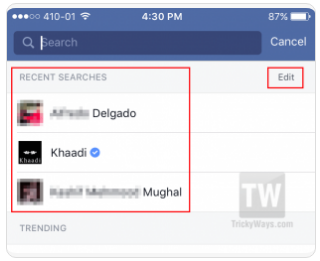
* Once you logged in, easiest means to clear search background is simply touch the search box on top. This will certainly show you the listing of current Facebook searches. Touch the Edit link offered on that search background checklist.


* This will certainly take you to Task Log web page where you could see all search history of Facebook.
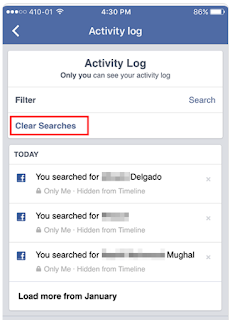
* You get rid of individual history product by touching 'x' icon on the right-side of each entry. To erase all the history at once simply tap the "Clear Searches" link as revealed below then touch "Validate" switch to earn certain you really intend to get rid of background.


Method-2.* Open Facebook app and after that touch the food selection icon.
* Scroll-down to the bottom and tap "Activity Log" choice.
* This page not only show you the search background yet various other task as well including sort, comments, messages, etc. If you wish to view search background activity just then touch the "Filter" link on the top and afterwards choose "Look" choice from the listing.
* This will certainly filter all the task log by search history just. Currently, simply tap the "Clear Searches" link and confirm it by touching "Confirm" button on the next page.

Get Rid Of Facebook Browse History from Internet Browser.
Method-1 (fast).
Open your web browser on Windows COMPUTER or Mac OS X and after that log into your Facebook account.
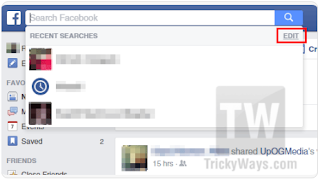
Click in the search box as well as you will see your current search. Click the edit web link and also this open a page with all the checklist of search background.


* Right here, erase details search history or just click the "Clear Searches" connect to get rid of all the Facebook search background simultaneously.

Method-2.
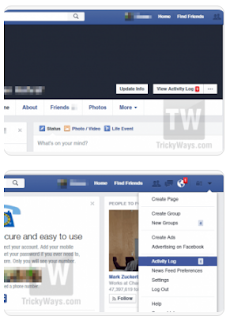
* On you profile primary page you see "Sight task" switch or an additional method to accessibility activity log, you need to click the small downward arrowhead symbol in the top right of Facebook web page and also click on Activity log.


* Once you get on task log web page, you will certainly have the ability to view every one of your task browse through Facebook. While you go to that web page, you can additionally delete any kind of or every one of your task log e.g. searches, likes, remarks, etc. if you want. In that situation, the comment or likes itself will not be erased but just the history will be gotten rid of.

* To see search history only then you need to filter the log. On the left-side click the "More" link to increase the food selection.


* Select "Browse" alternative as shown listed below. This will filter activity log by search and the total search background will certainly be in front of you. You may click on "Clear searches" and also all of the searches will certainly be eliminated.


Similar to this message leave your comments below, If you have any type of associated question we are below to solve you issue, just utilize remarks create below to leave a message.

Delete My Facebook Account NOW

How do I delete Facebook account completely Right Now? Is it possible to permanently delete your Facebook profile, messages, photos, videos and Facebook friends? Here is a complete way to get rid of your FB account.
You may have navigate through complex settings on Facebook and searched in Google to get rid of it. But you didn’t find a way to completely delete your Facebook account.

Even Facebook don’t want that you should leave Facebook easily. You have tried to deactivate your Facebook account, but this is not the permanent way to come out from Facebook.

What to do before deleting your Facebook account
1. Backup your data by moving to drop down menu -> General tab in the left column -> click on “Download a copy”


2. Send your friend an e-mail letting them know you will no longer be on Facebook. You can drop a message through Facebook that you are leaving Facebook

3. Uninstall any Facebook apps that you use to login to Facebook. It may be that you are logged via Android Mobile, iPhone, or Blackberry. These may unintentionally cause you to remain logged in even after you attempt to delete your Facebook account. While you could also log out from these apps, but the safest measure is to get rid of them entirely.

Below step by step guide lead you to delete Facebook account:

1. Login to your Facebook account and then click below secret delete Facebook account link.
https://www.facebook.com/help/delete_account

2. Pop up window will appear and then click Delete my account


3. Confirm your decision with pop-up window. The pop-up window says “You are about to permanently delete your account. Are you sure?“. Enter password and security check and then click ok


4. After confirming, again new pop-up window appears “Permanently Delete Account“. It says ” Your account has been deactivated from the site and will be permanently deleted within 14 days. If you log into your account within the next 14 days, your account will be reactivated and you will have the option to cancel your request.”


5. Now you would be logged out from your Facebook account. Check your email with the subject “Account Scheduled for Deletion“. In a mail you are requested again to cancel your request to permanently delete your account. It indicates that Facebook still doesn’t want to lose you. If you still want to come again to Facebook world, login with a given link.


6. When you will log in again, a new pop-up appears. It say to either to “Cancel Deletion” or “Confirm Deletion“. Now again the choice is yours, “Cancel Deletion” if you want to come again or “Confirm Deletion” if you still stick with your decision.

Things to Note
1. Never login again next 14 days, if you are sure you wish to permanently delete your account.

2. If you wish to come back again, simply follow the link below within 14 days

3. Must log out of anything connected with Facebook. It may include any app or service that you’ve connected or logged in. It may be Instagram, Calender app, Spotify etc. on your smartphone.

4. Clear your browser’s cache and cookies from your desktop, smartphone and tablet. Otherwise, saved login credential on your respective devices will trigger account reactivation.

Friday, 17 August 2018

How We Close Facebook Account


How We Close Facebook AccountFacebook has ended up being the default method of communication for interacting with good friends for over five million individuals. At the same time, there have actually been several really legitimate issues regarding privacy, marketing your info as well as various other risks. Many individuals have decided to close their Facebook accounts as well as move to various other socials media such as Twitter as well as Google Buzz.

Despite the factor you intend to shut your account there are a couple of points you might wish to do prior to ending.

Allow People KnowYou may want to leave a message on your standing bar for some time prior to disengaging: "Closing this account quickly! If you want to interact, send out a message for get in touch with information!" This way individuals that really do care about you can be sure to stay in touch. There are many various other websites with much less dispute regarding their usage of your details, such as Diaspora, where you can continue to be social online.


Do You Need the Information?If you want to keep the memories of Facebook without really getting on the site, you could download a total back-up of your whole profile. Click on "Account" from your main web page, and afterwards on "Account Setup" on the drop-down menu. This will offer an option to "Download your info.".


Below step by step guide lead you to delete Facebook account:

1. Login to your Facebook account and then click below secret delete Facebook account link.
https://www.facebook.com/help/delete_account

2. Pop up window will appear and then click Delete my account


3. Confirm your decision with pop-up window. The pop-up window says “You are about to permanently delete your account. Are you sure?“. Enter password and security check and then click ok


4. After confirming, again new pop-up window appears “Permanently Delete Account“. It says ” Your account has been deactivated from the site and will be permanently deleted within 14 days. If you log into your account within the next 14 days, your account will be reactivated and you will have the option to cancel your request.”


5. Now you would be logged out from your Facebook account. Check your email with the subject “Account Scheduled for Deletion“. In a mail you are requested again to cancel your request to permanently delete your account. It indicates that Facebook still doesn’t want to lose you. If you still want to come again to Facebook world, login with a given link.


6. When you will log in again, a new pop-up appears. It say to either to “Cancel Deletion” or “Confirm Deletion“. Now again the choice is yours, “Cancel Deletion” if you want to come again or “Confirm Deletion” if you still stick with your decision.

Things to Note
1. Never login again next 14 days, if you are sure you wish to permanently delete your account.

2. If you wish to come back again, simply follow the link below within 14 days

3. Must log out of anything connected with Facebook. It may include any app or service that you’ve connected or logged in. It may be Instagram, Calender app, Spotify etc. on your smartphone.

4. Clear your browser’s cache and cookies from your desktop, smartphone and tablet. Otherwise, saved login credential on your respective devices will trigger account reactivation.


How To Delete A Page I Created On Facebook 2018

Erasing a page on Facebook is as easy as subscribing/ producing the Facebook page to begin with. Yet one thing is extremely obligatory prior to one can eliminate his or her Facebook page from Facebook - "You have to be an admin of that page".

How Can I Delete A Page I Created On Facebook 2018.


So exactly how can you delete a page you produced on Facebook?
To erase your web page, you should follow the detailed guidelines borrowed from Facebook aid center to delete your page.

How you can delete a Facebook Web page Permanently and Promptly.If you have actually totally made up your mind to allow go of your Facebook account, then you have to check to see that you are the admin of the web page you plan to remove, you'll require an admin login priviledge of that particular page you wish to obtain rid of. If you are certain you have that web page, then comply with the steps underlined listed below to conveniently eliminate your Facebook web page.

The best ways to remove a Facebook Web page.1. Click Setups at the top of your Web page.

2. From General, click Eliminate Page.

3. Click Erase [Page name]

4. Click Delete Page then click OK.

Additionally remember your Page won't be permanently erased till 2 Week has actually expired, but you could un-publish your Page at any moment.

Ways to cancel or Reverse Facebook Page deletion.Follow the ideas listed below to terminate your Facebook page deletion:

1. Go to your Page within 2 Week of scheduling to erase your Web page.

2. Click Cancel Removal on top of your Page.

3. Click Confirm and after that click OK.

Note that you can additionally remove your personal Facebook account.
Note: In the event where you cannot find the remove alternative on your Facebook Web page, make sure that you're truly an admin of that Page.

Facebook Update Free

Facebook, a social system where we reach fulfill numerous individuals tries to maximize its individuals' satisfaction by making continuous updates of the application. So, upgrading your app once in a while offers you the possibility to enjoy the numerous possibilities and attributes offered to you by the Facebook group.


Update Facebook Application On Android Phones From Google Play StoreTo download and install or upgrade facebook app from google play Store is extremely simple as well as easy so simply comply with the treatments written listed below to download and install or update the application on your mobile app.

- Click on "update" FB app on your gadget currently.
- Then click on install, that's all.
- Go to your applications menu as well as open up the freshly mounted FB application.
- Then fill your Facebook information to sign in, and appreciate your conversation.

Update FB Application on iOS From Apple Store for iPad and iPhone- Visit Facebook main iphone connect to download and set up FACEBOOK App on iPhone or iPad by clicking Here or Here.
- On the web page that appears, click "Get App".
- Adhere to the actions and also mount your Facebook Application.

So, what are you awaiting? Download and install as well as Update your FB App to enjoy even more incredible functions!

Top Five New Facebook Showcases in 2017 You Should KnowThere is no question to say that Facebook is one of one of the most interactive social networks applications. As well as the wonderful information is that programmers keep on updating it time to time with brand-new collection of functions. Several of you could not be aware regarding the changes that were made to Facebook system but they are actually very intriguing as well as valuable. Despite whether you are utilizing Facebook for your personal requirements or it is an essential service promo system for you; in both cases you will be profited with brand-new features of Facebook. So, why not to stay tuned to these newest patterns and make most out of them to engage your audience on social media sites.

The article below will supply you detailed details regarding 5 brand-new Facebook attributes that were included just recently in 2017. Keep here on this web page.

1. Facebook 360:
Facebook 360 was launched on 8th March 2017. This application is powered by Oculus and sustained in Samsung Gear VR. With this most current technology, customers could share spectacular 360 degree video clips along with stills on Facebook. Right after its launch day, this feature has actually been accessed by numerous customers and also till currently one million 360 video clips and 25 million 360 pictures have been published on Facebook.

This type of video clips can be shared and suched as on Facebook same as other routine videos. Individuals could conveniently find the trending material on Facebook, they can conserve favourite media files, share videos as well as photos of fans or manage their favorite collection on a different tab.

If you wish to download this just recently updated Facebook 360 app for your Gear Virtual Reality then simply open Oculus app on your gadget as well as initiate search for Facebook 360 application. You could also visit official website of Oculus to obtain begun.

2. Messenger Day-- The Snapchat Means:
This app was also launched in the month of March and also remarkably it resembled biggest competitor versus Instagram Stories and also Snapchat. However, couple of functions like sticker labels, filters and posts going away within 24 hours etc are likewise same as that of various other completing platforms.

You could locate Carrier Day function straight in already existing Facebook Messenger as well as it will certainly help you to check people that are active for real time chats. Testimonials about Messenger Day disclose that this tool improves thought sharing on social media platform. Individuals could quickly share concerning what they are doing or what are their strategies ahead. For instance if you have having coffee at your much-loved dining establishment as well as wish to tell your friends regarding it then you merely should record a selfie, placed a sticker on it as well as straightforward transfer it to your friend.

Another fascinating thing to find out about this recent upgrade to Facebook is that it currently contains numerous interactive filters that users could conveniently put on their images to excite the audience. If you are a biased Snapchat customer then this feature can help you to transfer to Facebook app soon.

3. Facebook Live:
Earlier, Facebook customers were using Facebook Live API to live stream on Facebook from their smart device or tablet computer. Now it is possible to begin transmitting directly from your Laptop computer or Individual desktop computer using Facebook Live Function. Further, Admins can likewise label others as Live Contributors during streaming process on pages. You can additionally add remarks to live broadcasts which were not feasible earlier. So it is right time to discover the brand-new Facebook Live feature on your device, you will conveniently locate it in addition to the information feeds.

4. Advertising Capabilities:
If you are a publisher or use Facebook for business promotions then here is terrific information for you all. This recent update of Facebook has actually revolutionized your advertising abilities as well as currently your brand can avail maximum exposure within minimum time. Here are couple of interesting points that you can do currently:

- Publishers could now use Target market Networks to publish their advertisements in addition to quotes to Facebook so that their targeted audience can remain tuned to all most recent brand updates.

- It is now possible to combine ad breaks of around 25 secs into online video clips. That's actually outstanding.

5. Group Videos:
Last but not the least, Group video conversation is the best remedy to all insane carrier customers who wishes to stay connected with all their buddies on the move. The incredible news is that you can add regarding 50 users to one video team conversation. Even more, it will additionally help you to put fun filters to keep your conversations interactive as well as packed with giggling. In case if you locate those Facebook conversation heads annoying on your tool display then you could currently easily eliminate them from account setups. In straightforward words, Facebook has lots of things covered inside its platform for you all; prepare yourself to have the real fun.